
Week 1 of Design
WEEK 1
The first part of our project was to use Tinkercad, an Arduino simulator, to start writing and testing some basics functions we are going to use in our project. Tinkercad is a free web-based tool that permits to create and simulate circuits that are based in the Arduino platform.

Using this website we were able to recreate an scenario using 4 ultrasonic sensors, 1 servo motor, 1 DC motor, and a H-Bridge. The LCD display and the second Arduino were added to learn and test more about serial communication between components. During this first phase of our project, we were able to synchronize the servo and DC motor spinning movement with the data obtained by the ultrasonic sensors. This component interaction is based in two functions. The first function that we named as SensorMeassuring controls the ultrasonic sensors. This function receives the pin number were the sensor is connected and return the distance that is read by that sensor.

The second function was named as CheckforClearance and uses the reading of all 4 ultrasonic sensors for determine if there is enough space around the car while moving or before executing an order. This variable receives a value that represents the minimun distance necessary for executing an order and returns a True or False boolean variable that is used by the program to continue to the next order.
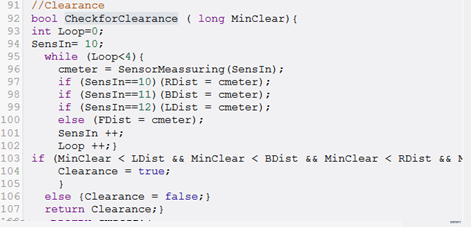
Additionally, to these 2 functions we also wrote some pieces of the code that are going to control the DC motor and the servo motor as observed in the example below.

As observed, the data received by the 2 functions that we have created so far is used to control the spinning of the motors included in this project.
Both, functions and rest of the code were wrote thinking in future modifications as we receive the physical components of our project.
Comments